

Dragon Support for Healthcare Solutions: Why Healthcare Teams Turn to The Dragon People
Healthcare teams searching for support often find broad product pages. But when the issue involves Dragon Copilot, Dragon Medical One, DAX transitions, microphones, EHR workflow, or provider adoption, you need practical help from people who understand how Dragon works in real clinical settings.

Microsoft provides the Dragon technology. The Dragon People help healthcare teams make it work in the real world.
That difference matters. Official support resources can help with product access, documentation, and account pathways. But clinical teams often need a different kind of help: workflow diagnosis, provider training, microphone setup, EHR behavior, troubleshooting, adoption support, and practical guidance after go-live.
What “support for healthcare solutions” really means for Dragon users
For Dragon users, support for healthcare solutions should mean more than finding a sign-in link or reading a product article. It should help your clinicians use Dragon with confidence during real patient care.
That includes the surrounding workflow: how providers document, what microphone they use, how their EHR responds, how they review notes, how they handle templates and commands, and who helps when friction shows up after launch.
Workflow diagnosis
Start with the real issue, whether it involves adoption, accuracy, setup, hardware, EHR behavior, or training gaps.
Provider-ready training
Give clinicians practical instruction that matches their specialty, pace, documentation style, and confidence level.
Long-term optimization
Support does not stop at launch. Strong Dragon workflows improve through feedback, refinement, and follow-up.
Official product support vs. real-world Dragon workflow support
Official Microsoft support resources play an important role. They can help teams access product support, learning resources, and account-related paths. The Dragon People add a practical support layer for the clinical workflow around Dragon.
| Support need | How The Dragon People help | Why it matters |
|---|---|---|
| Dragon Copilot rollout | Plan the workflow, provider groups, training path, audio strategy, and go-live support. | A good rollout helps clinicians start with confidence instead of guessing their way through a new AI workflow. |
| Dragon Medical One support | Help with setup, training refreshers, accuracy concerns, commands, templates, microphone habits, and daily use. | Many Dragon issues come from workflow details that generic documentation cannot fully solve. |
| DAX and Dragon Copilot transitions | Help teams understand what changes, how to communicate the shift, and how to train users for the new workflow. | Clinicians adopt faster when the transition feels clear, practical, and supported. |
| Microphone and audio issues | Evaluate the environment, provider movement, device choice, and microphone setup. | Dragon workflows depend on usable audio, especially when ambient documentation enters the room. |
| Post-launch support | Troubleshoot friction, retrain users, improve workflows, and keep adoption moving after go-live. | Support after launch helps prevent small issues from becoming workarounds, frustration, or abandonment. |
The practical difference: product support helps you find the official path. Workflow support helps your clinicians use Dragon successfully during real patient care.
Dragon solutions The Dragon People support
The Dragon People focus on the Dragon ecosystem healthcare teams rely on every day. That makes support more practical because the conversation can include software, audio hardware, clinician behavior, EHR workflow, training, and adoption together.
Dragon Copilot
Implementation, training, note review habits, Dragon Medical One and DAX transition planning, audio strategy, and go-live support.
Explore Dragon Copilot SupportDragon Medical One
Setup, provider training, accuracy improvement, microphone behavior, custom words, auto-texts, templates, and workflow refinement.
Improve My Dragon Medical One WorkflowDAX transition support
Communication, training, workflow mapping, and adoption planning for teams moving from DAX-style documentation into Dragon Copilot.
Plan My DAX TransitionWhy healthcare teams turn to The Dragon People
Dragon support works best when someone can look at the full picture. The software may be only one part of the problem. The real cause may involve microphone placement, workflow habits, user confidence, EHR behavior, noisy rooms, incomplete training, or a rollout plan that moved too fast.
They diagnose before they recommend
The Dragon People start by understanding the practice, specialty, user group, documentation problem, and support history. That helps the team recommend a practical path instead of treating every issue like a license question.
They train around real provider behavior
Clinicians do not all document the same way. Support should account for specialty workflows, note habits, confidence level, microphone preference, and the difference between dictation, ambient capture, and AI-assisted note review.
They support the full Dragon environment
Dragon success depends on more than a product login. The surrounding environment includes Dragon Copilot, Dragon Medical One, DAX transitions, microphones, EHR workflow, provider training, and long-term support.
They stay involved after go-live
The first few weeks often reveal the support gaps that matter most. Ongoing help gives clinicians a place to bring questions, friction, and workflow problems before frustration spreads.
Microphone and audio support belongs in the Dragon conversation
Many support problems sound like software problems at first. In reality, audio quality, room noise, device selection, and provider movement can shape the entire experience, especially for ambient clinical documentation.
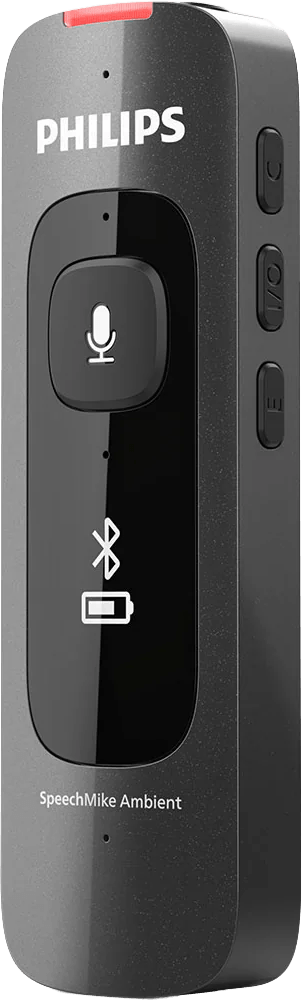
That is where Philips SpeechMike Ambient for Dragon Copilot can fit. The Dragon People help healthcare teams decide whether SpeechMike Ambient, Philips SpeechMike Premium Touch, or another microphone path makes the most sense for the way clinicians actually work.
For ambient workflows
Support the move from “dictate every word” to capture, generate, review, and complete.
For adoption support
Give clinicians an audio setup that feels natural enough to keep using.
Signs your practice needs Dragon support
You may not need to replace your system. You may need someone to diagnose the support gap and help the workflow work the way clinicians expected it to work.
Provider experience signs
- Providers avoid using Dragon even though licenses are active.
- Some users get good results while others struggle.
- Training happened once, but confidence dropped after go-live.
- Clinicians feel unsure how to review, correct, or complete AI-assisted notes.
Workflow and support signs
- Notes need too much cleanup before completion.
- Microphone setup feels inconsistent by room or provider.
- EHR behavior causes frustration or slows documentation down.
- No one owns post-launch troubleshooting, retraining, or optimization.
Start with the Dragon problem, not just the product name
Healthcare teams often search for Dragon Copilot support, Dragon Medical One support, Microsoft Dragon support, Nuance Dragon support, or support for healthcare solutions because something in the workflow needs attention.
The best first step is to name the problem clearly. Are providers struggling with accuracy? Are they uncertain about Dragon Copilot note review? Are microphones creating friction? Is the practice moving from Dragon Medical One or DAX? Did the launch happen without enough training? Each problem needs a different support path.
A better support question: “What is stopping our clinicians from using Dragon confidently every day?” Once you answer that, support becomes much more useful.
What to expect from a practical Dragon support conversation
A good support conversation should help your team move from general frustration to a specific plan. The Dragon People can help identify what is working, what is getting in the way, and what to fix first.
- Review the current Dragon product, user group, and documentation workflow.
- Identify whether the issue involves software, workflow, training, audio, EHR behavior, or adoption.
- Recommend the right support path for Dragon Copilot, Dragon Medical One, DAX transition planning, or microphones.
- Create a practical next step for setup, training, troubleshooting, or optimization.
- Support the team after the first fix so the workflow keeps improving.

Bring us your Dragon friction. We’ll help map the fix.
Whether your team needs Dragon Copilot support, Dragon Medical One help, DAX transition planning, microphone guidance, or post-launch troubleshooting, The Dragon People can help you turn Dragon from “installed” into “working.”
1. Diagnose
Tell us where Dragon is creating friction and what your clinicians need to do faster or better.
2. Build the plan
We recommend the right mix of setup, training, microphone strategy, workflow support, and optimization.
3. Support adoption
We help your users keep improving after go-live so Dragon becomes part of the daily workflow.
FAQ: Dragon support for healthcare solutions
What does Dragon support for healthcare solutions mean?
It means practical support for the Dragon tools healthcare teams use to document care, including Dragon Copilot, Dragon Medical One, DAX transition planning, microphones, EHR workflow, provider training, troubleshooting, and post-launch optimization.
Is The Dragon People a replacement for Microsoft support?
No. Microsoft support resources are important for official product access, account pathways, and product documentation. The Dragon People help with the real-world Dragon workflow around implementation, training, troubleshooting, microphone setup, EHR behavior, and adoption.
Can The Dragon People help with Dragon Copilot support?
Yes. The Dragon People can help healthcare teams plan Dragon Copilot rollouts, train clinicians, support note review habits, evaluate audio workflows, troubleshoot friction, and support adoption after go-live.
Can The Dragon People help with Dragon Medical One?
Yes. Support can include setup, training, accuracy improvement, microphone habits, custom words, templates, commands, workflow refinement, and planning a move from Dragon Medical One to Dragon Copilot.
Do microphones really matter for Dragon support?
Yes. Microphone choice, placement, room noise, and provider movement can affect the Dragon experience. The Dragon People can help evaluate microphone options, including Philips SpeechMike Ambient for Dragon Copilot workflows.
Do The Dragon People support teams after go-live?
Yes. Post-launch support can help teams troubleshoot issues, retrain users, improve workflow habits, adjust microphone strategy, and keep adoption moving after implementation.
How should we start if we are not sure what Dragon support we need?
Start with the problem your clinicians feel most often. The Dragon People can help determine whether the issue involves setup, training, product fit, EHR workflow, audio quality, note review, or post-launch support.