

Dragon Copilot can help clinicians spend less time wrestling with documentation and more time focused on the patient. But even the best AI documentation workflow depends on the quality of the conversation it captures.
That makes audio strategy more than a technical detail. It affects note quality, provider confidence, training success, and long-term adoption.
When practices evaluate Dragon Copilot, they often focus on the AI first. That makes sense. The software can help transform the clinical documentation process by capturing conversations, supporting draft note creation, and helping care teams reduce manual work.
But the room still matters. The microphone still matters. Provider habits still matter. A strong Dragon Copilot rollout should include a clear plan for how audio gets captured in real exam rooms, not just how the software works in a demo.
The simple takeaway: better audio gives Dragon Copilot a stronger starting point. That can make the entire workflow feel smoother for clinicians, staff, and patients.
Why audio quality matters for Dragon Copilot
Ambient clinical documentation starts with a real conversation. Patients speak at different volumes. Clinicians move around the room. Staff may step in. HVAC systems hum. Doors open. Keyboards click. Every practice has a different sound environment.
Dragon Copilot can support a more efficient documentation workflow, but it still needs clear audio capture as part of the overall setup. When a practice overlooks audio, clinicians may spend more time reviewing, correcting, or adjusting their workflow than expected.
Cleaner capture
Clearer audio helps the system work from a stronger version of the encounter conversation.
Less noise friction
Room layout, device placement, and background noise can affect how comfortable the workflow feels.
Better note review
When the captured conversation starts clean, clinicians can focus more on reviewing the note for clinical accuracy.
The audio strategy most practices miss
A Dragon Copilot audio strategy does not need to feel complicated. It should answer a few practical questions before go-live:
- Where will the provider be during most patient conversations?
- Will the clinician sit, stand, walk, or move between devices?
- How noisy are the exam rooms during a normal day?
- Will one clinician use the workflow, or will several providers share rooms?
- Does the practice need a wearable microphone, a workstation microphone, or a mix of both?
- What should providers say to patients before ambient documentation begins?
These questions help turn Dragon Copilot from a new technology into a real clinical workflow. They also help practices avoid the most common adoption problem: asking clinicians to change habits without giving them the right setup.
Four parts of a stronger Dragon Copilot audio setup
Room readiness
Start with the physical space. A small exam room with limited noise may need a different setup than a busier specialty clinic where clinicians move between patients, staff, and workstations.
Look for the obvious issues first: loud fans, open doors, shared spaces, rolling carts, speakerphone habits, and workstation placement. Small changes can make the workflow feel more natural.
Microphone selection
Microphone choice should match the way clinicians work. Some providers need hands-free flexibility. Others prefer a device tied to a workstation. Some practices may need different options by role, room, or specialty.
Philips SpeechMike Ambient can fit this conversation because it gives practices a wearable option designed for AI-assisted clinical documentation workflows. The right fit depends on room behavior, documentation goals, and provider comfort.
Provider habits
Dragon Copilot should support the visit, not interrupt it. Providers need a simple rhythm for starting the encounter, explaining the technology to the patient, speaking naturally, and reviewing the note afterward.
This does not mean clinicians need to sound robotic. It means they need a repeatable pattern that helps the technology capture the right context without adding more mental effort.
Training and optimization
The first setup rarely becomes the final setup. Practices should plan for early feedback, provider coaching, and workflow adjustments. A short optimization window can help teams catch issues before frustration spreads.
The best question is not only “Is Dragon Copilot working?” It is also “Does this workflow feel easy enough for clinicians to keep using?”

Where Philips SpeechMike Ambient fits
Philips SpeechMike Ambient gives practices another way to think about clinical audio capture. Instead of treating the microphone as an afterthought, it places audio strategy at the center of the ambient documentation workflow.
SpeechMike Ambient does not replace a Dragon Copilot implementation plan. It supports one part of that plan: giving the AI documentation workflow a stronger audio foundation.
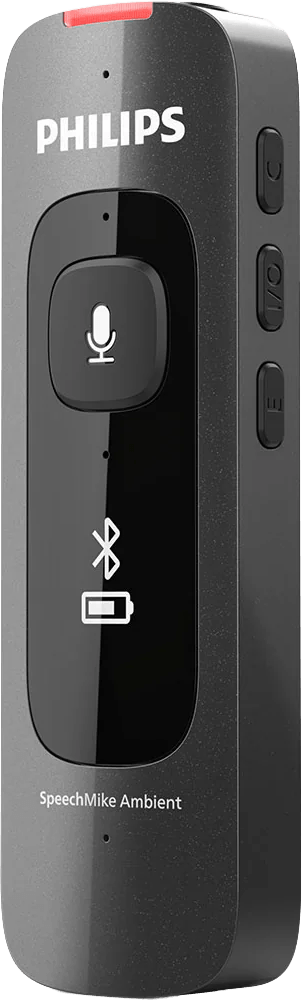
Wearable workflow
A wearable device can support clinicians who move naturally during the visit.
Clinical environments
Selectable audio modes can help teams think through different rooms and use cases.
AI audio support
AI-powered audio processing can support clearer capture for documentation workflows.
Common signs your practice needs an audio review
You do not need to wait until a full rollout to think about audio. A quick review can help before implementation, during a pilot, or after clinicians start using Dragon Copilot in daily care.
Provider experience signs
- Clinicians feel unsure where to place the microphone.
- Providers repeat themselves more than expected.
- Staff hear complaints about room noise or patient distance.
- Clinicians avoid using ambient capture in certain rooms.
Workflow signs
- Notes require more cleanup than expected.
- Providers use different habits with no standard process.
- IT cannot tell whether issues come from software, hardware, or room setup.
- Training focuses on features, but not on real exam room behavior.
A simple Dragon Copilot audio checklist
Before your next Dragon Copilot demo, pilot, or rollout, walk through this checklist:
- Identify the rooms where Dragon Copilot will get used most often.
- Watch how clinicians move during a normal patient visit.
- Document background noise patterns by location and time of day.
- Decide whether each provider needs hands-free capture, workstation capture, or both.
- Create a simple patient introduction script.
- Train providers on how to start, pause, and review their workflow.
- Collect feedback during the first week and adjust quickly.
Practical tip: Do not evaluate audio only in a quiet test room. Test in the real spaces where clinicians see patients, move around, and document throughout the day.
Better audio supports better adoption
Dragon Copilot works best when the practice treats implementation as more than a software install. The clinical environment, the microphone, the provider’s workflow, and the training plan all shape the experience.
That is why an audio strategy matters. It helps clinicians start with confidence. It gives IT a clearer support path. It helps administrators plan for adoption instead of reacting to frustration later.
Most importantly, it helps Dragon Copilot support the reason practices consider ambient documentation in the first place: giving clinicians a smoother way to document care while staying more present with patients.

Need help evaluating your Dragon Copilot audio setup?
The Dragon People can help your practice think through room setup, microphone options, provider training, and workflow optimization before or after your Dragon Copilot rollout.
FAQ: Dragon Copilot audio strategy
Does Dragon Copilot need a special microphone?
Not every practice needs the same microphone setup. The right choice depends on room noise, provider movement, workstation placement, and how the clinician wants to document during the visit.
Why should we think about audio before a Dragon Copilot rollout?
Audio affects the starting point for ambient documentation. Planning ahead can help clinicians feel more comfortable, reduce avoidable friction, and make training more practical.
Where does Philips SpeechMike Ambient fit?
Philips SpeechMike Ambient can support practices that want a wearable microphone option for AI-assisted clinical documentation workflows. It makes the most sense when the provider’s movement and room setup call for that type of capture.
Can The Dragon People help with Dragon Copilot setup and training?
Yes. The Dragon People can help with Dragon Copilot setup, provider training, workflow planning, microphone recommendations, and optimization support.