Work through your browser
Access Dragon Copilot web using the latest version of Microsoft Edge or Google Chrome on your Mac.

Looking for Dragon Medical for Mac? Microsoft Dragon® Copilot gives clinicians a browser-based path to medical dictation, ambient documentation, and AI-assisted clinical notes on a Mac.
The Dragon People will review your Mac, browser, microphone, EHR, and preferred documentation workflow before recommending the right configuration.
Dragon Copilot expands beyond traditional medical dictation by combining speech recognition, ambient capture, and AI-assisted documentation. Mac users can access the Dragon Copilot web experience through a supported browser without installing the Windows desktop application.
Access Dragon Copilot web using the latest version of Microsoft Edge or Google Chrome on your Mac.
Use speech-driven documentation alongside ambient capture and AI-assisted note creation, summaries, and workflow support.
We evaluate your EHR, browser, microphone, documentation habits, and organizational requirements before recommending a rollout.
Dragon Copilot provides a practical browser-based option for Mac users, but each clinical environment works differently. The Dragon People will confirm how the product fits your devices and daily workflow before you move forward.
Your final configuration depends on how you document, where you want generated content to go, and how your EHR behaves in your browser environment.
Dragon Copilot is the primary path for clinicians who want to work from a Mac. Dragon Medical One remains available for Windows-based clinicians who prefer a traditional real-time dictation workflow.
A broader clinical documentation experience that combines dictation, ambient capture, and AI-assisted content through web, mobile, desktop, and supported EHR experiences.
A proven Windows-based option for clinicians who prefer direct real-time medical dictation, voice commands, templates, and traditional cursor-focused productivity.
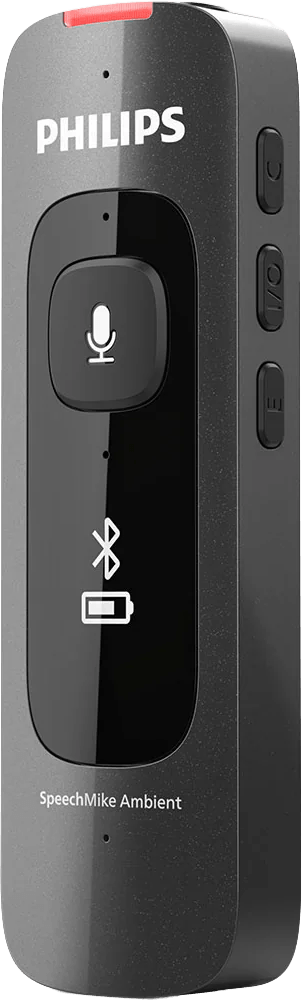
A traditional dictation microphone focuses on the clinician’s voice. Ambient documentation requires a microphone that can clearly capture everyone participating in the conversation.
PowerMic and Philips SpeechMike devices provide focused audio for traditional speech-driven documentation.
Use an omnidirectional microphone designed to capture multiple speakers around the room.
We will help you understand what Dragon Copilot can do on your Mac before you make a product or implementation decision.
We identify your Mac model, browser, EHR, network environment, microphone, and current documentation process.
We determine whether you primarily need real-time dictation, ambient documentation, AI-assisted notes, or a combination.
We recommend Dragon Copilot, Dragon Medical One for a Windows environment, or another configuration based on your needs.
The Dragon People can assist with configuration, templates, workflow optimization, end-user training, and ongoing support.
Answers for clinicians and healthcare organizations evaluating a Mac-based Dragon workflow.
Mac users can access the Dragon Copilot web application through the latest version of Microsoft Edge or Google Chrome. Browser, microphone, network, and EHR behavior should be reviewed before deployment.
Not for basic Dragon Copilot web access. The browser-based experience does not require the Windows desktop application. Your EHR or other clinical applications may have separate technical requirements.
Microsoft currently lists the latest versions of Microsoft Edge and Google Chrome for the standalone Dragon Copilot web application. Third-party cookies and microphone access must also be enabled.
Compatibility and workflow behavior depend on your EHR, browser, integration, security configuration, and how you want to move generated content into the patient record. The Dragon People reviews these factors individually.
Many USB microphones may work when macOS and the browser can recognize them. PowerMic and Philips SpeechMike devices are recommended for focused dictation. Ambient workflows generally require an omnidirectional microphone that can capture multiple speakers clearly.
Yes. Dragon Medical One remains available for Windows-based environments and may fit clinicians who prefer traditional real-time dictation, voice commands, and cursor-focused documentation.
Schedule a consultation with The Dragon People to review your device, EHR, microphone, and documentation goals.
Experience the Future of Healthcare

Healthcare Clinical Applications Sales Executive
✉️ brittany.whitney@thedragonpeople.com
☎️ 239-423-5800